Grafting together multiple RALs#
This page describes RAL Grafting - a method of linking multiple smaller RALs together.
For larger SoC designs, generating one monolithic PyRAL may not be the most practical way to organize a project. It may be useful to generate smaller RALs for individual subsystems, then stitch them together to a top-level RAL.
Doing so is useful for several reasons:
Allows vertical re-use. A subsystem’s RAL can be used in a smaller application component, and then re-used at the system-level.
More flexible organization of your Python library. Keep RALs organized alongside the Python modules that use them.
Enable incremental updates. No need to re-generate an entire system’s RAL when only one sub-component changed.
Example 1: A Monolithic RAL#
Consider the following set of SystemRDL files that define a system’s address space:
addrmap awesome_peripheral {
    reg {
        field {} f1[7:0];
        field {} f2[15:8];
    } awesome_reg;
};
addrmap splendid_device {
    reg {
        field {} f1[7:0];
        field {} f2[15:8];
    } splendid_reg;
};
addrmap my_soc {
    awesome_peripheral  awesome_A @ 0x10_0000;
    awesome_peripheral  awesome_B @ 0x20_0000;
    splendid_device     splendid_X @ 0x30_0000;
    splendid_device     splendid_Y @ 0x40_0000;
};
One option would be to generate this using a single PyRAL export:
mkdir my_soc_ral
touch my_soc_ral/__init__.py

peakrdl pyral \
    awesome_peripheral.rdl splendid_device.rdl my_soc.rdl \
    -o my_soc_ral/
This results in a monolithic RAL that could be visualized as follows:
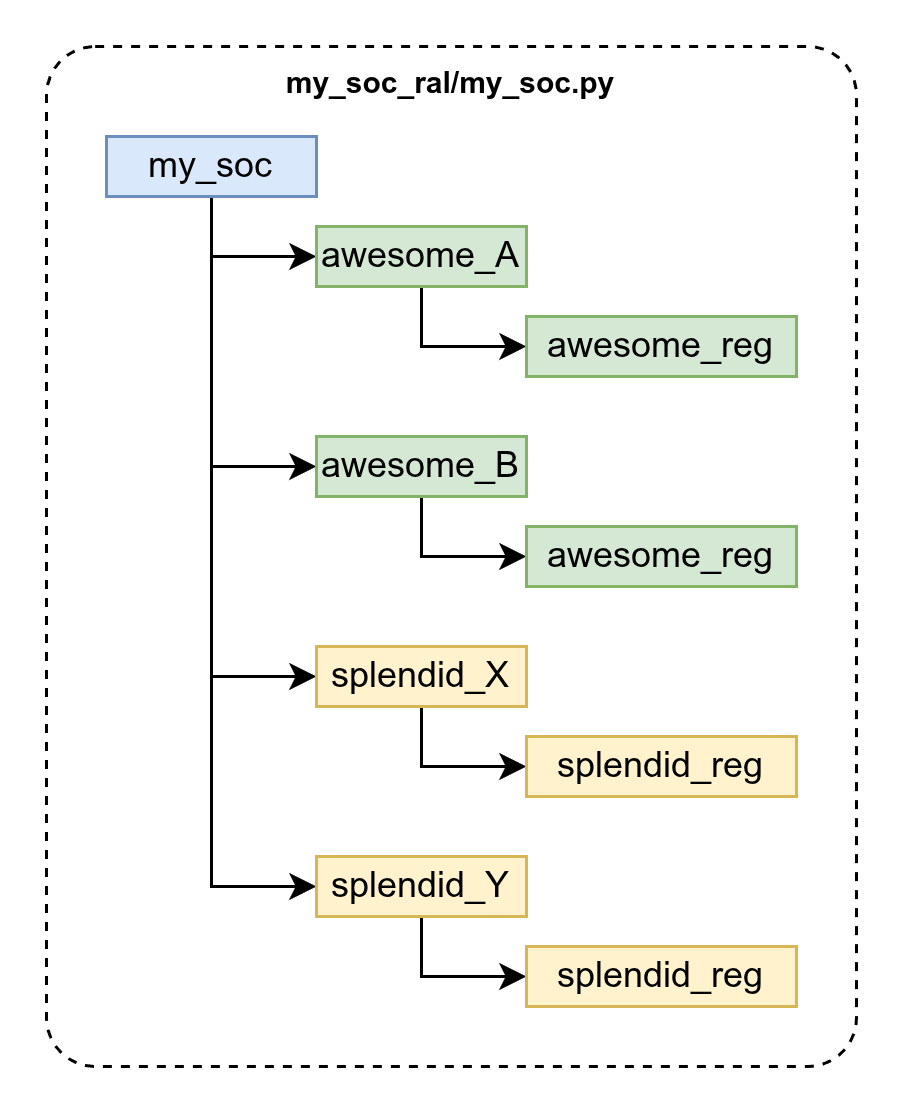
Example 2: Grafting together multiple RALs#
Building on Example 1 - What if I want to organize my application as follows:
All Python code related to the
awesome_peripheralis in a sub-folderawesome/All Python code related to the
splendid_deviceis in a sub-foldersplendid/Each of these sub-folders are organized as packages, containing an
__init__.pyfile.Generate separate RALs for each, and graft them onto a top-level RAL that represents
my_soc
First, export each individual subsystem’s RAL separately:
peakrdl pyral awesome_peripheral.rdl -o awesome/
peakrdl pyral splendid_device.rdl -o splendid/
Then, generate the top-level RAL, but instruct it to graft any nodes that match
the RDL type-names awesome_peripheral and splendid_device to their
respective Python import paths. Notice that the import paths are relative to
the location of the RAL module being exported.
mkdir my_soc_ral
touch my_soc_ral/__init__.py

peakrdl pyral \
    awesome_peripheral.rdl splendid_device.rdl my_soc.rdl \
    -o my_soc_ral/ \
    --graft-type awesome_peripheral=..awesome.awesome_peripheral \
    --graft-type splendid_device=..splendid.splendid_device
The resulting file structure is:
example_2/
    __init__.py
    awesome/
        __init__.py
        awesome_peripheral.py
        awesome_peripheral.db
        awesome_peripheral_stubs.pyi
    splendid/
        __init__.py
        splendid_device.py
        splendid_device.db
        splendid_device_stubs.pyi
    my_soc_ral/
        __init__.py
        my_soc.py
        my_soc.db
        my_soc_stubs.pyi
And the resulting RAL can be visualized as follows:
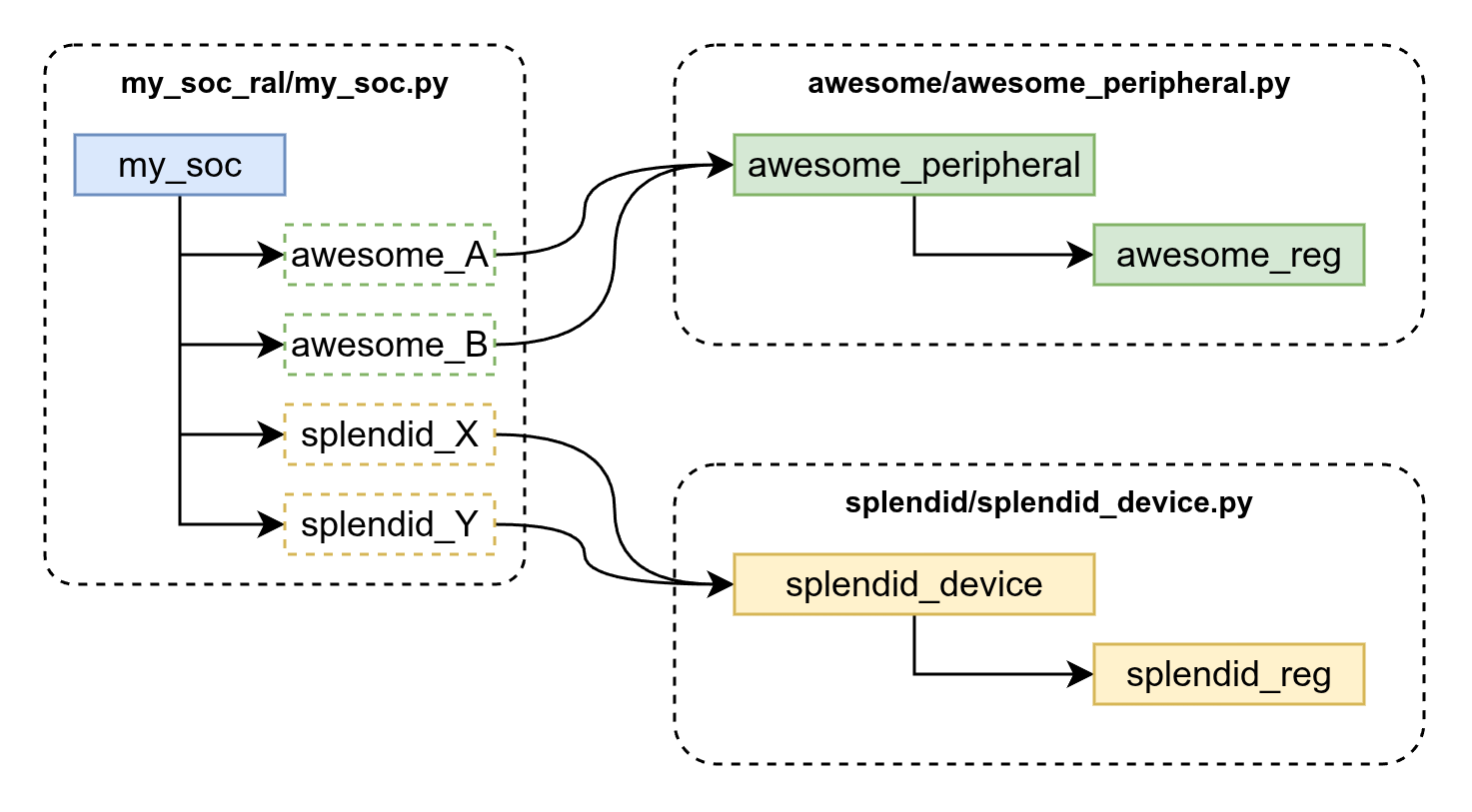
Notice how the grafted RAL is functionally identical to the monolithic one from the prior example. Import the top-level RAL, and seamlessly reference the grafted subsystems:
from my_soc_ral import my_soc

ral = my_soc.get_ral()
ral.awesome_A.awesome_reg
ral.awesome_B.awesome_reg
ral.splendid_X.splendid_reg
ral.splendid_Y.splendid_reg